Distributed BTS 2006 Configuration Tips

Sometimes BizTalk Server 2006 configuration is getting a tough task, I've been through a problem to configure BTS on more than one machine, hosting the databses on a SQL Server 2005 machine, and BTS on another different machine on the same domain, and I have got so many error messages, all of those were because of credentials; BizTalk Server domain accounts are not able to create or manage databases on the SQL Server machines, so 2 things you will have to ensure they are done, when configuring BTS on more than one machine:
  1. DTC is enabled on both SQL Server and BizTalk Server machines, you can refer to DTC configuration at this troubleshooting BTS configuration at technet.
  2. Creating all the BizTalk and SSO windows groups required by BTS to access the respective SQL Server host, basically you will need to create the following groups:

    - Biztalk Isolated Host Users
    - Biztalk Application Users
    - SSO Administrators
    - Biztalk Server Administrators

If you come through any error while configuring, check the group that needs to be created and create it locally on SQL Server machine, then edit the newly created local groups, add each corresponding BizTalk domain group to the respective local group ( e.g. local BizTalk Application Users to domainName\BizTalk Application Users ), so BTS will have access to databases.

Labels:

Creating BizTalk Schemas From Database

Introduction

Sometimes you may need to create your schemas based on database tables, so it would be very tedious if you go to BizTalk Editor, and start building your schemas, while you already have the tabular model built at SQL Server, needless to say that SQL Server 2005 provides a great and inherent support for XML, the magical FOR XML clause has been enhanced to give more flexbility and funcionality, you can read more about the FOR XML new features at What's New in FOR XML in Microsoft SQL Server 2005.

Preparing Sample Data


However, I was trying to automate building BizTalk Schemas from Database tablse, and this
algorithm flashed in my mind:
  1. Build a small generator, that will list all the database tables, and then execute one Query using FOR XML to read target table contents, and set XML namespace, and rename root name.
  2. Generate one file for each table, that will be named using the same name of the table, considering the SQL Schema, in this case, e.g. Users.Suppliers.
  3. Use BizTalk Editor Wizard, hopefully using API , to generate a XSD schema from the generated table contents.
  4. Inspect all elements' types manually; in case I get any inconsistent type generated.

That is the algorithm that I tried to follow to generate schemas from database tables, but after some searching, I didn't find any API about how to use the generator wizard, and then I did it manually using a query in SQL Server 2005 Management Studio, so in this post I will point out what I have done in very basic steps to generate BizTalk Schemas from database tables. I will use the AdventureWorks sample database that is shipped with SQL Server 2005, also I will use Production.Product table, and also I will proceed step by step until we acheive our goal that's generating the schema successfully.

First I tried to run this Query against the AdventureWorks database:

SELECT TOP 1 * FROM Production.Product FOR XML AUTO

And it yielded the following results:

<Production.Product ProductID="1" Name="Adjustable Race" ProductNumber="AR-5381" MakeFlag="0" FinishedGoodsFlag="0" SafetyStockLevel="1000" ReorderPoint="750" StandardCost="0.0000" ListPrice="0.0000" DaysToManufacture="0" SellStartDate="1998-06-01T00:00:00" rowguid="694215B7-08F7-4C0D-ACB1-D734BA44C0C8" ModifiedDate="2004-03-11T10:01:36.827" />

If you compare this instance to the table's design you will find so many fields omitted, such as ProductLine, Class, DiscontinuedDate, etc.., these fields are not included because SQL Server omits the null-valued fields, so this is the first problem that should be sorted out, secondly all the fields are returned as attributes, this is because of including the AUTO clause, and mostly you will need to make the properties of your schema as elements, so this should be modified as well.

To convert all the attributes into elements modify the query to be like this:

SELECT TOP 1 * FROM Production.Product FOR XML Path('Product')

This gives the following results:

<Product>

<ProductID>1</ProductID>

<Name>Adjustable Race</Name>

<ProductNumber>AR-5381</ProductNumber>

<MakeFlag>0</MakeFlag>

<FinishedGoodsFlag>0</FinishedGoodsFlag>

<SafetyStockLevel>1000</SafetyStockLevel>

<ReorderPoint>750</ReorderPoint>

<StandardCost>0.0000</StandardCost>

<ListPrice>0.0000</ListPrice>

<DaysToManufacture>0</DaysToManufacture>

<SellStartDate>1998-06-01T00:00:00</SellStartDate>

<rowguid>694215B7-08F7-4C0D-ACB1-D734BA44C0C8</rowguid>

<ModifiedDate>2004-03-11T10:01:36.827</ModifiedDate>

</Product>

To add the root node and rename it to Products, you can run the following query:

SELECT TOP 1 * FROM Production.Product FOR XML Path('Product'),ROOT('Products')

This gives the same recordset but surrounded with :


<Products>


<Product>

</Product>


</Products>


To include all the fieldset for the table even the null valued columns, you can run the following query:


SELECT TOP 1 * FROM Production.Product FOR XML Path('Product'),ROOT('Products'), ELEMENTS XSINIL


This gives the following results :


<Products xmlns:xsi="http://www.w3.org/2001/XMLSchema-instance">;

<Product>

<ProductID>1</ProductID>

<Name>Adjustable Race</Name>

<ProductNumber>AR-5381</ProductNumber>

<MakeFlag>0</MakeFlag>

<FinishedGoodsFlag>0</FinishedGoodsFlag>

<Color xsi:nil="true" />

<SafetyStockLevel>1000</SafetyStockLevel>

<ReorderPoint>750</ReorderPoint>

<StandardCost>0.0000</StandardCost>

<ListPrice>0.0000</ListPrice>

<Size xsi:nil="true" />

<SizeUnitMeasureCode xsi:nil="true" />

<WeightUnitMeasureCode xsi:nil="true" />

<Weight xsi:nil="true" />
<DaysToManufacture>0</DaysToManufacture>

<ProductLine xsi:nil="true" />

<Class xsi:nil="true" />

<Style xsi:nil="true" />

<ProductSubcategoryID xsi:nil="true" />

<ProductModelID xsi:nil="true" />

<SellStartDate>1998-06-01T00:00:00</SellStartDate>

<SellEndDate xsi:nil="true" />

<DiscontinuedDate xsi:nil="true" />

<rowguid>694215B7-08F7-4C0D-ACB1-D734BA44C0C8</rowguid>

<ModifiedDate>2004-03-11T10:01:36.827</ModifiedDate>

</Product>

</Products>

Now, the next step is to add namespace to the generated output, you can accomplish this by running WITH XMLNAMESPACES, that accepts a list of named namespaces to your output XML:

WITH XMLNAMESPACES

(

DEFAULT 'http://CairoCafe.Blogspot.com/Production.Product'

)


SELECT TOP 1 * FROM Production.Product FOR XML Path('Product'),ROOT('Products'), ELEMENTS XSINIL


This will append to the root node (Products), this XML namespace:

xmlns="http://CairoCafe.Blogspot.com/Production.Product"

One last thing is that, for all null valued columns, the BizTalk Schema generator, tries to assign a proper data type for one element, but whenever all the column values are null, the generator will not be able to reveal the data type of the element and it assignes xs:anytype to the element's data type, so it is always better to feed the generator with the maximum number of XML records, so this will make the job of the generator easier, so to work this out, we need to remove the TOP 1 from the previous queries and then run the last SQL query save the contents into one XML file, let's call it Production.Product_Instance.xml, we will use this file to generate the XSD schema.

Generating Schema using Generator Wizard

Now, our sample data XML file is ready, and all we need to do is few steps to get the schema created:
  1. Launch VS.NET 2005, and create an Empty BizTalk Project, and give it any name.
  2. Right click your project from solution explorer and select "Add Generated Items.."


  3. Add Generated Items Wizard Will launch, Select Generate Schemas from left tree and press OK


  4. You can generate schemas from DTD Schema, XDR Schema, or Well-Formed XML, select Well-Formed XML, and browse and select the Production.Product_Instance.xml file

    Note: XDR Schema is the only installed feature, for the other 2 document types, you have to install manually, browse to C:\Program Files\Microsoft BizTalk Server 2006\SDK\Utilities\Schema Generator , and you will find two script files, .vbs, run the first one InstallWFX.vbs , to install the Well-Formed XML document type, and for DTD Schema, run InstallDTD.vbs.

  5. Press OK to get the schemca generated.

  6. Schema is generated if you go through all the elements, you will find that the data types are set accurately, and with proper memory allocation, but feel free to change the data types as per your design, one important thing to mention is the DiscontinuedDate field, it has datatype as xs:anytype, because it is null for all the XML rows in the generated XML file, you will need to change this manually, if you try to do it from the properties window, VS.NET is not listing the other datatypes if the datatype is xs:anytype, so you will need to change it either in notepad or open using XSD schema editor and viewing code, you can do this by right clicking the schema from the solution explorer and selecting : Open With.. , then XML Schema Editor.


Labels:

BTS 2006 DB Vocabulary Problem


I have been facing this problem with Business Rules Composer, whenever I try to create a new vocabulary, that's pointing to a database column I get the above error, and actually I wasn't aware about what's going on behind the scenes, I do the following steps to create a new database based vocabulary:
  • Launch Business Rules Composer.
  • Right click Vocabularies, and select Add New Vocabulary.
  • Under the new vocabulary right click Version 1.0 (not saved), and select Add New Definition.
  • Select Database Table or Column.
  • The wizard shows the settings page for the database table or column definition, click Browse, from Connect to SQL Server window, enter the server configurations you want to connect to, I connect to localhost and use windows authentication.
  • Select AdventureWorks database, expand it and select any table, e.g. Address, you will get the above error message box saying: "Invalid object name {TableName}" , after so many inspections and selecting differnet tables, I tried to select another table such as AWBuildVersion, I could add it successfully and selected the field I want to add as a definition, I concluded the following : "If the table you're adding is related to any schema other than dbo, you get the above error.", I tried to find out a resolution to this issue but I couldn't, if anybody has a solution please reply to this post!.

Note: I tried to create a new database, in case AW database has any special configuration, and added 2 tables one with dbo schema and the other with another schema I created, then I tried to add a new definition, but I faced the same problem; I could use the dbo schema table, but for the other table it throws the same error.

Labels:

BizTalk Server 2006 on Vista

In this post, I will mention how could I install, configure, administer, and run BizTalk Server 2006 on Vista, I just installed vista 3 times before, and I really like to upgrade, but at the same time I want to use the new operating system to the max by migrating all my development work and applications to the new cutting-edge Vista.

I installed Vista Ultimate, and then I updated it, then restarted the machine, ah !, my machine is 1.83 GHZ, core duo, 1 GB RAM, however first thing I did was to disable UAC, User Access Control, simply speaking UAC is a new feature in Vista, that limits application rights, and this reminds me of CAS in .NET, or Code Access Security, so UAC will alert you every time one application tries to do one administrative action, so if you have any virus or malware on your system that's trying to do some malicious actions, UAC will show a modal window that is asking for your permission to run this application, and frankly it's a very annoying feature, esp. for developers and administrators, and some applications will act inconsistently when UAC is working behind the scenes, so it's better disable it, at least for me, to get more information about the UAC , for more information about UAC refer to this guide.

You can disable UAC in so many ways, you can do it through UI, or command line, and I preferred to do it via UI, I did the following to disable UI:
  1. Press CTRL+R, type msconfig
  2. System configuration will launch, go to Tools tab.
  3. Select "Disable UAC"
  4. Reboot the machine.

After you reboot you will get a red icon in the toolbar, and this is the security warning that you will get every time when you start your system, right click it and select exit.

Then, I started to install SQL Server 2005, and as you may know that you cannot run BizTalk on SQL Server Express Edition, I like to run Developer edition, as this is a development machine, and it would be better to run developer edition, I launched installation, and the wizard went through the checklist peacefully,but there was one warning about IIS, the installation wizard was not able to detect IIS 7, however after some searching, I got to know how to fix this issue, I needed to add some IIS feature that are not installed by default when you install Vista, to get around this check this Microsoft article, after checking the full list and added all required components, I restarted SQL server installation wizard and it installed successfully, also one more interesting thing, SQL Server 2005 is not installing the sample Adventure Works databases, by default so you have to select custom installation and select them, after finishing installation I opened the AdventureWorks, ran some queries, everything was fine.

Next step, was to install Visual Studio.NET 2005, I opted to install the Team Suite Edition (TS), because I like to have all the features installed, however while installing both SQL server and VS.NET I got one window more than once, warning about a well known compatibility issue of VS.NET 2005 with Vista, I simply selected to resume, if you want to get the full list of issues for VS.NET 2005 with Vista, refer to this article on Microsoft, after installing VS.NET I created one windows application and it ran well, also I created a test web application and also it ran successfully, then I proceeded to the next step that's installing BizTalk.

I launched the BizTalk Server 2006 installation wizard, and selected to download the cab file that contains all required components to run BizTalk, it launched Microsoft Downloads website in an external IE window, and it was pointing to the cab file for Windows Server 2003, I downloaded the cab file, and then restarted installation and gave path to the cab file I downloaded before, installation completed successfully, and that was great for me, then I finished installation and checked to launch the configuration wizard, I selected Basic Configuration, the configuration went well, but i took so long time more than expected, it took about 10-15 minutes, maybe more than this, however after successful configuration I opened one simple BizTalk application that I had build before, it simply contains 2 schemas, one map, and one orchestration that writes a message to 2 different file locations based on one conditional decide, I rebuilt the 2 projects, first messaging one, then orchestration project, then I set deployment options to deploy to my local server, I deployed assemblies successfully, and then launched the BizTalk Server 2006 Administration Console, to create physical send and receive ports and bind them to the orchestration, first I started with creating the receive location, but after filling all required fields and pressing OK, I got the following error : " Could not store transport type data for Receive Location 'rcvLocEmployee' to config store. Primary SSO Server '{MachineName}' failed. Could not contact the SSO server '{MachineName}'. Check that SSO is configured and that the SSO service is running on that server".

I wanted to check the SSO service from Services console, hit CTRL+R, typed Services.msc, launched Services console, I checked the "Enterprise Single Sign-On Service", and the status was "Starting", I right clicked the service and stopped it, then started it, it started well, then I recreated the receive port, and this time it passed , and then I created a couple of send ports, and it passed as well, then I started the BizTalk Application 1, it started successfully this time, because before I restart SSO service I tried to start it but it didn't.

I enabled the receive location and enlisted and started the 2 send ports I just created, everything ran quite well, then I bound the physical ports to my orchestration and it got bound successfully, I started to test my simply application by copying an XML message to the receive location, after a while it disappeared as expected and got copied to the destination folders, as per my orchestration logic, I tested another message and it was working greatly, and finally I made sure that everything is working fine, I was so happy to do it , as I have searched on Google so many times but couldn't find clear walk through to get BTS 2006 running on Vista, I opened BizTalk Configuration and exported my configuration settings to XML file, so I can consume later in case of any disaster, I checked the BAM site and it was running as well, also I ran some queries in HAT and it ran as expected, my next step is to install Service Packs to fix these compatibility issues.

Happy BizTalking on Vista!

Labels:

BizTalk Server 2006 Configuration Problem

I was configuring BizTalk Server 2006 on Windows Server 2003, actually this machine has been configured before many times, but this time every time I try to configure it either through basic or custom configuration, I have been getting SSO error, the configuration utility is not able to create a database for SSO, after sometime I remembered that I have uninstalled SQL Server 2005 before, and kept SQL Server 200 ( surely with SP4 ), and as a normal behavior for SQL Server uninstall, it keeps all the databases in data folder, so everytime I was trying to configure it by creating new databases, it was saying that the user account is not able to access the SSO database, and when I opt for using an existing that database, it was throwing an error as well, becuase the databsae file is already there just like a detached database, so if I create a new database it will not accept as the data folder contains a physical file with the same name, however I searched the data folder and found all the configuration databases that BizTalk Server configuration utility is creating, then I deleted all the log files and database files, ran the configuraion again, it worked peacefully, so next time you get configuraion errors, have a look at the SQL server data folder, maybe you will find some databases that are kep from prior configuraiton.

Note: you will only get this error for SSO because the other services are dependent on SSO and the configuration utility is creating the SSO first, then it congiures the other services.

Labels:

New DataSet Fails After BTS 2006 Installation

After BizTalk Server 2006 Installation, if you try to add a new DataSet to your project, and then select to add it to the App_Code folder, you will get an error message saying: “Object reference is not set to an instance of an object.”, and when you press OK to dismiss this modal dialog box, you will the Add New Item window again, and the loop continues.., I searched around but I couldn’t find a solution or anything relevant to this weird problem, I tried to figure out what’s going on, so I will drive you the solution in case you face this problem.

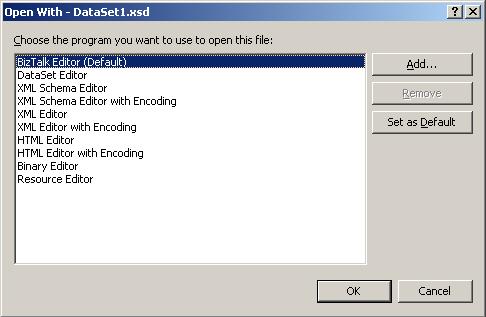
After getting the error message press OK, and then press Cancel for the second Add New Item window, right click the DataSet from the solution explorer, and select “Open With”, you will get the following window, and as you can see the BizTalk Editor (Default) coming at the top, so to open the XSD file properly select DataSet Editor, then the Visual Studio 2005, will open the DataSet in the DataSet Designer and the Toolbox will get populated with the DataSet group; like TableAdapter, Query, Relation, etc..

Open DataSet With, the BizTalk Editor is the Default that's why it fails to add XSS file

Moreover, if you collapse the DataSet node in the solution explorer, you will find the XSS file with the same name of the DataSet, I think this is the reason behind this exception, as the BizTalk Editor is not able to manage such a file.

Note: you can make the DataSet Editor the default application that manages XSD files from the Open With window.

Labels:

BTS 2006 BTSService.odx Missing File

While Installing BizTalk Server 2006, I got one error message about one missing file; that file is :

G:\Msi\Program Files\Developer Tools\BizTalkProjectItems\BTSService.odx,

then I found out that this file is not existent in my CD, I pressed ignore, and resumed installation, however after few days I was developing one BizTalk Application, and I tried to add a new orchestration file, but every time I try to do it I find the left pane empty when I select Orchestrations from the left pane, this error aroused my anger, especially I searched on the Internet to resolve this problem, but it seems no one else got it but me, however I remembered that file I missed while installing BizTalk Server 2006, and fortunately I have another machine where I installed BTS 2006 before and I could add orchestration files, I got this file from the path above, and surprisingly the file size was ZERO !, I think that’s why I couldn’t find it on the ISO image I installed BTS from, I think the ISO creator I have used is not including zero files, I copied the file to the first machine, and luckily it has worked, but the question is that as long as this is a zero sized file, and it’s completely empty, why VS.NET 2005, recreates it upon startup when it’s missing from the BTS developer tools?

Labels:

HTTP Receive Adapter Configuration in IIS 5.1

BizTalk 2006 Receive Adapter lets your application accepts XML messages over HTTP protocol, definitely you will need to use the HTTP Receive adapter to use the HTTP channel, for this purpose you will need to create a web application that constructs and posts an XML message to a receive location, if you have gone through consuming the HTTP Receive adapter you would know that you should host the adapter at one web application, basically this application is the main web application that’s posting the XML message to be dispatched by the receive adapter, and this web application will often be an ASP.NET application, for this purpose you will need to use the BizTalkServerIsolatedHost , as the web application or the ASP.NET application, that’s hosting the HTTP Receive adapter, is running in different process other than the BizTalk Process, so the isolated host will be used to give this out-of-process adapter an access to the BizTalk management database, but at the same time the web application should have the enough privileges to be provided to the isolated host to access the BizTalk management database, noting that all other adapters like FILE adapter are running under the BizTalk runtime except SOAP and HTTP adapters, so to be able to post XML messages to the HTTP receive adapter you need to grant your web application the proper identity to access the BizTalk management database.

I suppose that you copied the HTTP Receive adapter BTSHTTPReceive.dll DLL under your web application, this configurations are meant to Windows XP platform and Internet Information Server 5.1, so now you need to set permissions for your web application right from IIS manager MMC snap-in, run -> inetmgr, then spot your target web application, right click, select Properties, then from the Virtual Directory tab, set Execute Permissions to Scripts and Executables, and Application Protection to High (Isolated).

One more step is left; you need to configure the HTTP Receive Adapter from Component Services console, open the Component Services Console from Administrative Tools -> Component Services, from the left tree browse to Component Services -> Computers -> My Computer -> COM+ Applications -> IIS-{Default Web Site//Root/WebApplication, WebApplication is just a placeholder for your web application, right click this application, click Properties, select Identity tab, from Account group select System Account, and Interactive user – The current logged on user.

If you don’t set the HTTP Receive Adapter correctly; you will get an error message both in your web application, in case you handle errors, and in Event Log, this is the error message written to the Application Event Log:

The BizTalk HTTP receive adapter failed to initialize itself. Possible reasons:

1) Receive location URL is not created/configured correctly.

2) Receive location is not enabled.

3) HTTP receive adapter is not running under a user that has access to management and message databases.

4) Isolated host instance is not created for HTTP Receive adapter.

As you can see the error you will get most is number 3, and that’s we’ve resolved above.

Labels:

BizTalk Server 2006 MCTS

Microsoft Certified Technology Specialist, is a new certificate that is focusing on one technology, which makes the path to get a certificate shorter and smarter, the core objective of MCTS is to let you prove your skills and knowledge at one Microsoft Technology, and BizTalk Server 2006 is not an exception.

The BizTalk 2006 MCTS holder, will have a good understanding about how to design and develop BizTalk applications, creating Messaging architecture including schemas, maps, pipelines, adapters, and last but not least Orchestrations, also the holder will be aware of BRE (Business Rule Engine) usage, Human workflow, short and long term transactions, that was about the design and development of applications.

About the applications management and deployment, you will be aware of how to manage business processes, and how to deploy your applications.

The good news is that it’s only one exam, once you pass it; you become a BizTalk Server Certified, which is a good evidence to your knowledge and implementation, the roadmap to BizTalk MCTS is mentioned below ( as per Microsoft site )

Required Exams for MCTS: BizTalk Server 2006 (One Exam Required)

Courses

Books

Exam 70–235: TS: Developing Business Process and Integration Solutions Using BizTalk Server 2006 (available early 2006)

2933: Developing Business Process and Integration Solutions Using Microsoft BizTalk Server 2006 (available as five-day classroom training in early 2006)2934: Deploying and Managing Business Process and Integration Solutions Using Microsoft BizTalk Server 2006 (available as two-day classroom training in early 2006)

Programming Microsoft BizTalk Server 2006 Core Reference (available early 2006)


Labels:

BizTalk 2006 Installation

I have just finished installing BizTalk 2006 on Windows 2003 Enterprise Edition SP1, one of the things that made BizTalk 2004 a real pain was its installation, however installing BizTalk 2006 is a real fun, and it’s straightforward, It’s kind of ( Next, Next, …, Finish ), If you have Internet connection it’s better to let the installation wizard to update all required components through the web, or if you plan to install it to other machine, you can download a cab file and reuse it everywhere else, actually I cannot forget how hard it was to install BizTalk 2004 prerequisites, which made me opt to use VHD image, and I used MS Virtual PC, now it's easy to get it up as the wizard provides a component updater and it's really a one click configuration, how simple !, however to create Groups and get started with BizTalk 2006, if you have SQL Server 2000, you should have SP4 installed to configure BizTalk 2006 from BizTalk Server Configuration.

You can select Basic Configuration and BizTalk Configuration will take after everything, it’s really simple!

You can download SQL Server 2000 Service Pack 4 from here, then you can select the components that most interest you.

After you select Basic Configuration if there is anything incorrect you will get one warning, also to make sure everything is fine, run BizTalk Server 2006 Administration Console; actually it's MMC, from left tree expand BizTalk Server 2006 Administration , then expand BizTalk Group[MachineName:BizTalkMgmtDb], expand Applications node, you will get 2 applications; BizTalk.System, and BizTalk Application 1; this assures that group has been created correctly.

Note: After installing BizTalk 2006 it creates 2 default applications first is BizTalk.System which contains all artifacts required to run built-in applications like Business Activity Services ( BAS ), also it contains some components that are part of BizTalk runtime which is required to each and every BizTalk application, second application is just a default application.

Labels: